


Back Seat Navigator
3.2344.00 Reviews
App Specs
- Version
- 2.31.16.306
- Updated On
- License
- Free
- Downloads
- 100,000+
- Developer
- Affiliated Apps LLC
- Categories
- Maps & Navigation
- Platform
- Android
Screenshots
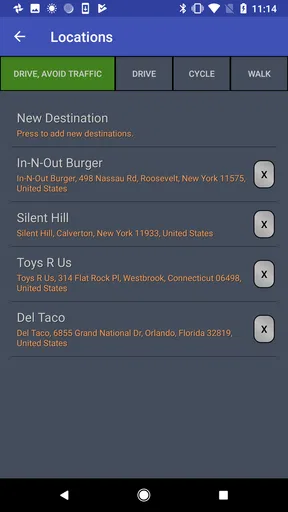
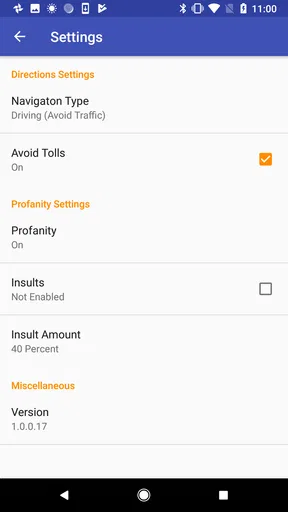
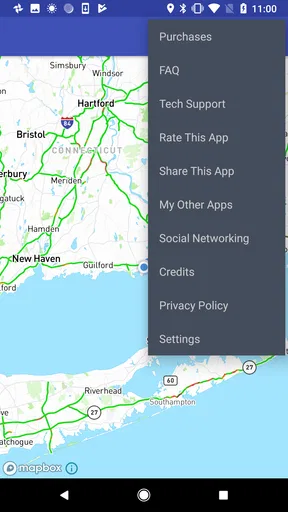
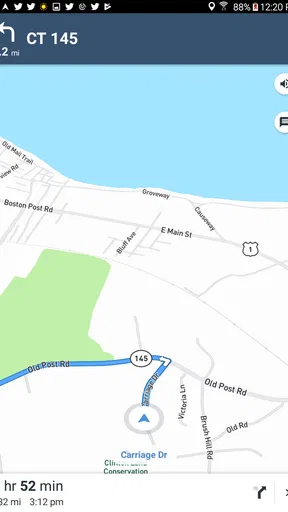
 Analysis by AppCompare
Most navigation apps try to make every journey quieter, faster, and more predictable. Back Seat Navigator takes a very different approach: its central appeal is a complaining navigation voice that turns ordinary directions into a running commentary. I found that this changes the purpose of the app more than I expected. It is not simply another tool for reaching an address; it is closer to a novelty companion for people who want their route to have a bit of attitude.
That distinction matters before you install it. If you need dependable, calm guidance for an unfamiliar city, a standard navigation service remains the safer choice. If you already know the route, are sharing a drive with friends, or want something deliberately irreverent in the passenger seat, this app has a much clearer reason to exist. My experience was that the personality is the feature, not a small extra placed on top of conventional mapping.
What the complaining navigator changes
The app sits in the Maps & Navigation category, but I would judge it less like a direct replacement for a conventional map and more like a themed navigation experience. The familiar job is still getting directions, yet the tone changes how those directions feel. A turn instruction can become part of a comic exchange rather than a neutral command, which makes a routine drive more memorable.
That sounds simple, but voice and timing have a practical effect. When a route feels repetitive, a distinctive voice can keep the driver or passengers paying attention. It may also make a familiar commute less dull. On the other hand, the same attitude can become irritating when I am concentrating on traffic, dealing with a complicated junction, or simply trying to drive in peace. The app works best when I choose it for the mood rather than expecting it to improve every aspect of navigation.
The store summary openly frames the experience around a navigation app that complains, while the short description calls it “Back Seat Navigator.” I read that as a useful warning about the product’s identity: the entertainment layer is the reason to try it. It is not pretending to be a silent utility, and users who dislike sarcastic or intrusive commentary will probably understand the mismatch immediately.
One useful way to think about it is as a shared-car app. A normal navigation tool is primarily for the person driving. This one can also be selected for the people sitting beside or behind the driver, because the voice becomes something everyone hears. That makes it more suitable for a road trip joke, a casual outing, or a deliberately silly first impression than for a serious solo journey where efficiency comes first.
Using it without letting the joke take over
In practice, I would set up the route before moving and treat the app as a companion during the drive rather than something to experiment with while the vehicle is in motion. The safest workflow is straightforward: choose the destination while parked, check that the route makes sense, begin navigation, and then leave the phone alone. The personality should add flavor to the trip, not become a reason to look down at the screen.
Worth Reading Before You Choose

EA SPORTS FC Mobile 26 Is a Bigger Football Game, but It Takes Time

Flipboard Shows What News Apps Must Do Beyond the Feed

Switching to Android Auto Means Rethinking Your Driving Routine

Google Calendar Makes a Crowded Week Easier to Manage

Ludo King Makes the Most of the Minutes Between Plans

Baby Panda World Brings Quick Play to Modern Phones, but Its Game Library Feels Busy
This is also where expectations need to stay realistic. A funny voice does not remove the need to confirm a difficult turn, watch road signs, or use common driving judgment. When a route passes through several lanes, unfamiliar exits, or dense city streets, I would rely on the visual map and road signage instead of assuming the character’s delivery makes every instruction clearer. The comedy can help attention, but it is not a substitute for careful driving.
A practical tip is to use it on routes you broadly understand rather than on the first drive through an area where a missed turn would cause real trouble. That lets you evaluate the personality without placing the entire trip on a novelty experience. It also makes the contrast easier to notice: when I know where I am going, the complaints feel like entertainment; when I am lost, they can feel like extra noise.
I would also decide in advance whether the passengers actually want the effect. One person may find the back-seat attitude hilarious, while another may find repeated commentary tiring after a few minutes. With a group, it can help to agree that the app is being used for fun and can be replaced if the tone stops being enjoyable. That small bit of coordination is more important here than it would be with a quiet map application.
Another trade-off is attention. A lively voice can make an instruction stand out, but a memorable line can also distract from the road if passengers react loudly or start discussing it. I would keep the volume at a level where directions remain understandable without turning every announcement into the main event. The best result comes when the character is noticeable but not competing with traffic awareness.
The strongest everyday scenario
The clearest use case for me is a familiar weekend drive with one or more passengers. Imagine heading to a friend’s house, a casual outing, or a nearby event where the route is not especially stressful. The driver can keep eyes on the road while the app supplies an intentionally grumpy presence, and passengers get something to react to. Because the destination is not a high-pressure navigation challenge, the personality has room to be the point.
This also works well when someone wants to test the app without committing to it as a permanent navigation tool. A short, known route reveals whether the complaining style is genuinely amusing or merely annoying. It answers the important question quickly: do you enjoy having a character comment on your directions, or would you rather hear only concise instructions?
I can see it being particularly effective as a novelty during a group trip. Instead of passing the phone around or asking everyone to watch the screen, the voice creates a shared experience from the passenger seat. That is a more specific benefit than simply saying the app is “fun.” It gives passengers a role as an audience, while the driver can still use the route as a practical guide.
There is a second, quieter scenario: a person who already knows a daily route but wants to break the monotony. In that case, the navigation function is almost a framework for the commentary. The app does not need to discover an exciting destination because the familiar journey provides the setting. I would still use it selectively, since a joke that feels fresh on one commute may feel repetitive if played every morning.
For a long trip, I would be more cautious. Novelty voices can lose their charm over time, and extended driving already demands sustained concentration. The app may be enjoyable in short bursts, but I would not choose it solely because the route is long. A calmer alternative may be better when fatigue, weather, heavy traffic, or difficult roads are involved.
Where the trade-offs become noticeable
The biggest limitation is obvious once the novelty wears off: the personality is not universally helpful. A conventional navigation app is usually designed to reduce friction, while this experience intentionally adds character to the instructions. That can be entertaining, but it may also make a simple turn feel more dramatic than necessary. People who want minimal audio clutter should skip it.
The average rating is 3.2 from around 600 ratings, with over 300 written reviews. I would interpret that as a sign of a divided audience rather than an automatic verdict. A personality-driven app naturally depends on taste. Someone who enjoys the premise may consider the attitude the whole point, while someone expecting a polished everyday navigator may judge the same behavior as a weakness.
There is also a difference between novelty and reliability. When I use a standard map service, I am usually evaluating route clarity, search convenience, traffic awareness, and consistency. With this app, I first evaluate whether the complaining presentation is enjoyable. That means it competes on a different axis. It may complement a regular navigation app for certain trips, but I would not automatically replace a familiar tool just because this one has a stronger voice.
Cost is another factor worth understanding. The app is free to install, but it includes in-app purchases ranging from $3.99 to $29.99 per item. I would decide how much the personality is worth to me before buying anything. For a novelty product, a purchase should feel like an intentional choice to extend the experience, not something I make simply because I have already spent time testing the free version.
The mature 17+ content rating also makes it unsuitable as a default choice for every family car. Even if the concept sounds like harmless comedy, adults should consider whether the tone fits the passengers who may hear it. I would be especially careful with younger riders or anyone who dislikes strong language and confrontational humor. This is one of those details that can determine whether the app feels amusing or inappropriate.
Device compatibility is reasonably broad: the current version, 2.31.16.306, requires Android 6.0 or later. That means owners of older supported phones may be able to try it without upgrading immediately, although the quality of any navigation experience still depends on the device, its screen, and the surrounding driving setup. I would never use an old phone in a way that blocks visibility or encourages unsafe mounting, regardless of which navigation app is running.
How it compares with ordinary navigation choices
Compared with a conventional map app, Back Seat Navigator has a narrower but more memorable purpose. Standard alternatives are better when I need a calm interface, familiar route planning, or a tool I can use across many kinds of journeys without thinking about the mood. Their strength is predictability. This app’s strength is that it makes the voice itself part of the outing.
Compared with a dedicated voice assistant, it is also more focused on the driving scenario. A general assistant may be more useful for questions, reminders, calls, or other hands-free tasks, while this app’s identity is built around navigation delivered with attitude. I would choose the general assistant when I want a broad helper and choose this one when I specifically want the passenger-seat character.
It is not a strong substitute for a navigation service chosen primarily for complex route decisions. On unfamiliar roads, I prefer a tool whose presentation stays out of the way and lets me concentrate on maps, signs, and timely instructions. The complaining style can be a bonus after the route is understood, but I would not let the entertainment premise decide a high-stakes trip.
The best comparison is therefore not “which app has the most features?” but “what kind of drive am I having?” For commuting, airport runs, urgent appointments, and difficult city navigation, the usual alternative is the sensible choice. For a relaxed drive with friends, this app offers something the quiet alternatives do not: a shared, deliberately annoying personality that can become part of the story.
Who will get the most from it
I think the ideal user is comfortable treating navigation as entertainment in the right setting. You may enjoy it if you regularly drive familiar routes, like unusual voice experiences, or want a conversation starter for passengers. It is also a good fit for someone who understands that the app’s value is emotional and social rather than purely technical.
It is less suitable for a driver who wants short, neutral instructions, dislikes sarcasm, or becomes distracted by extra audio. I would also steer away from it for professional driving, stressful unfamiliar routes, or trips where passengers need a calm environment. The mature rating reinforces that this is not a universal family-friendly recommendation.
If you are unsure, I would begin with a short route that you already know and keep the app free at first. Pay attention to whether the commentary makes directions easier to notice or simply makes the cabin noisier. That test tells you more than a long list of features because the central question is personal: does the complaining voice improve your mood without weakening your focus?
Affiliated Apps LLC has made a very specific kind of Maps & Navigation app, and I appreciate that it does not need to be everything for everyone. With over 100 thousand installs, it has clearly found an audience interested in the idea, even though the modest average rating shows that the experience will not suit every taste. I would describe it as a companion for selected drives, not a universal replacement for the navigation app already on your phone.
My final recommendation is simple: try it if you want the route to have a personality, especially when friends are in the car and the journey is more about enjoying the ride than solving a difficult navigation problem. Skip it if your priority is quiet precision. The real trade-off is entertainment versus calm concentration, and once I understood that, the app’s place became clear. It is free to try, distinctive in a crowded category, and potentially funny in the right setting, but its attitude should remain an optional layer—not the thing you trust blindly when the road demands your full attention.
Pros
- Simple interface that is easy to understand while riding in a car.
- Useful for passengers who need help with navigation from the back seat.
- Can make long journeys more engaging for children and families.
- Provides an alternative way to interact with route planning.
- Lightweight design should not require much storage space.
Cons
- Its usefulness depends heavily on having a front-seat driver.
- May be distracting if passengers use it while the vehicle is moving.
- Navigation accuracy can vary with device GPS and mobile signal.
- Some features may feel limited compared with full navigation apps.
- Battery usage could increase during extended trips with GPS enabled.
FAQs for Back Seat Navigator
What is Back Seat Navigator and who is it designed for?
Back Seat Navigator is a navigation-focused app intended to help passengers follow a route, understand upcoming turns, and stay oriented while traveling by car. It can be useful for people sitting in the back seat, children, passengers who want to monitor the journey, or anyone who prefers a clearer view of the trip without handling the driver’s phone. Its usefulness may depend on the device, available maps, and location permissions.
Does Back Seat Navigator require an internet connection to work?
The connection requirements can vary depending on the features and version available on your device. Basic route information may rely on GPS, while map downloads, live traffic, address searches, or updated navigation data may require mobile data or Wi-Fi. Before starting a trip, it is advisable to open the app, check the route, and confirm whether the necessary maps or information are available offline.
Is Back Seat Navigator safe to use while traveling?
Back Seat Navigator is intended for passengers, not for drivers who need to interact with a phone while operating a vehicle. The driver should always concentrate on the road and follow local traffic regulations. Passengers can use the app to view route progress or help with directions, but they should avoid distracting the driver. If the app displays navigation information, it should be treated as assistance rather than a replacement for careful driving.
What permissions does Back Seat Navigator request, and why are they needed?
A navigation app commonly requests access to location services so it can determine the device’s position and show progress along a route. Depending on its features, Back Seat Navigator may also need permission for notifications, internet access, or background location updates. Users should review each request carefully and grant only the permissions they are comfortable providing. Some functions may not work correctly if essential location access is denied.
Is Back Seat Navigator free to download, and are there in-app purchases?
The download price and available payment options can differ between Android and iOS, as well as by region and app version. Some versions may be free, while optional features, advertising removal, premium navigation tools, or additional map services could involve in-app purchases or subscriptions. Before downloading, check the official store listing for the current price, purchase details, supported devices, and cancellation terms.


